
-
Section 1 - Introduction
- Introduction
-
Section 2 - Accessing SMS
- Login and project selection
- SMS Roles
-
Section 3 - Interface
- SMS interface
-
Section 4 - Stakeholder Management
- Search and results
- Stakeholders
- Inquiries
- Contacts
- Followups
- Meetings
- Stakeholder Details
- Properties
- Business Information
-
Section 5 - Reporting
- Reporting Center
-
Section 6 - Calendar
- Events
-
Section 7 - FAQ
- FAQ's
-
Section 8 - Activities
- Activities
-
Section 9 - Misc. Tools
- Map center
- Hyperlinks
- News
- Users
- Mailings
- Forms
- My Open Contacts
- My Open Inquiries
- Stakeholders Assigned to Me
-
Section 10 - Engage Public
- Engage
Public
- Introduction
- Adding Polls
- Editing Polls
- Add Poll Answers
- Managing Polls
- Addling Ideas
- Managing Ideas
- Registering
- Manage Comments
- Analyzing Comments(Overview)
- Adding Documents
- Manage Documents
- Adding Events
- Manage Events
- Adding News
- Managing News
- Adding a Timeline
- Registering
- Admin Dashboard
- Add FAQ
- Manage FAQ's
- Add FAQ Categories
- Add a User
- Manage Users
- Manage Site
-
Section 10 - SMS Glossary
- SMS Glossary
//search goes here
Section 4 - Delete a Meeting
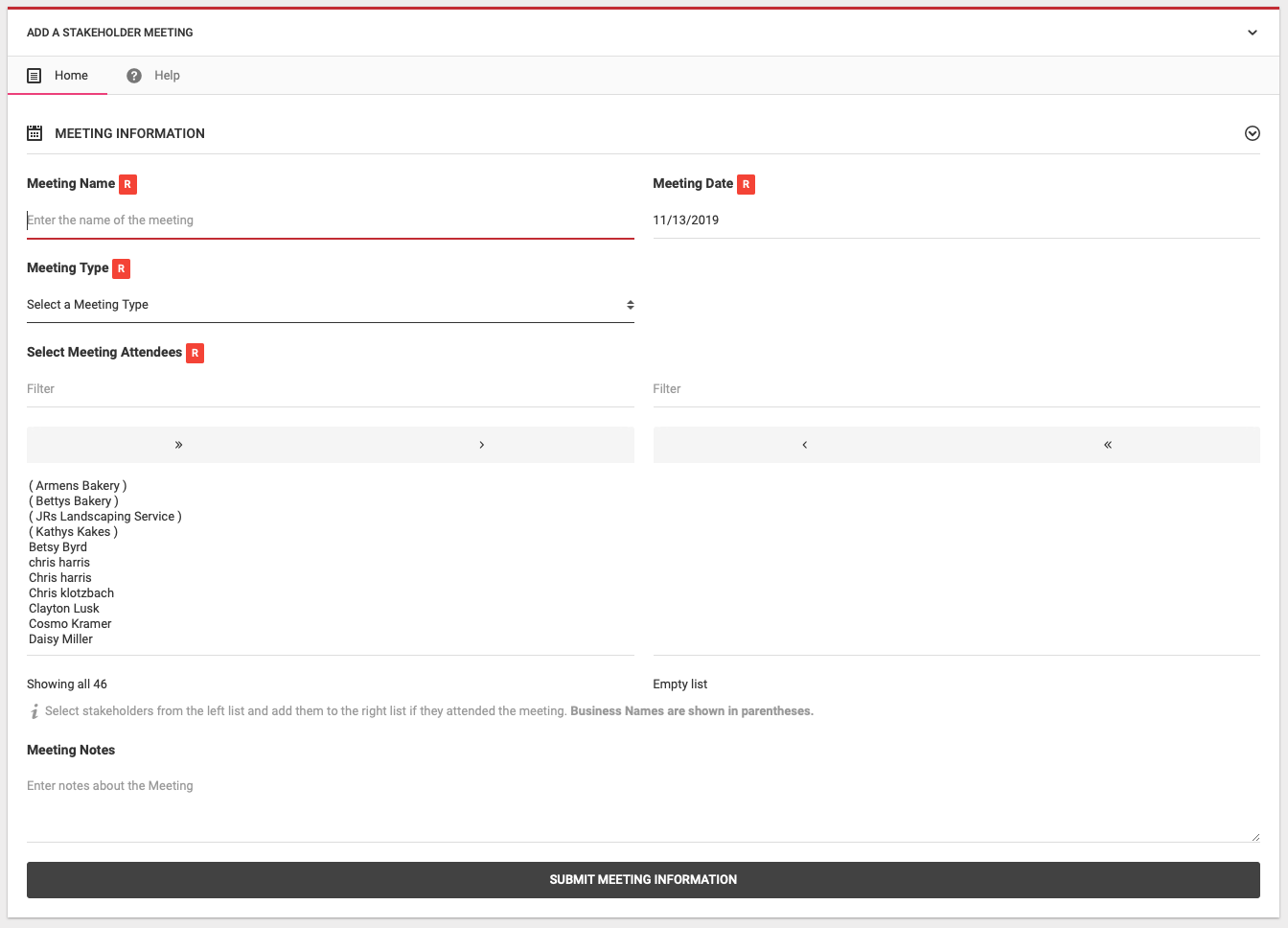
You have the ability to add a meeting to SMS. When you meet with multiple stakeholders at one time, you can add a meeting and this gives you the ability to flag multiple stakeholders that they attended the meeting.
Delete a Meeting Editor Manager Administrator
- Meeting Name R
- Enter the Meeting Name
- Meeting Date R
- Select the date of the meeting, it defaults to today's date
- Meeting Type R
- Select the type of Meeting
- Select Meeting Attendees R
- You can select who attended the meeting. All stakeholders are shown in the left column and you can use the arrows at the top of this column to move stakeholders over to the right hand column with indicates that they attended. Use the single arrow to move stakeholders one at a time. The double arrows moves over all stakeholders.
- Meeting Notes R
- Enter any meeting notes that are relevant
© 2008 - 2019. StakeholderLink by Steve Artis