
Section 3 - SMS Interface
Top Bar
 The top bar is at the top of all pages and contains the following:
- Logo Area
- Your company/project logo will be shown in the upper lefthand area.
- Notifications Area
-
This area keep you updated as to what you need to do on the site. The notifications area shows and links the following:
Stakeholders assigned to me:
Links to a page that displays all stakeholders that have been assigned to you.
My Open Contacts:
Links to a page that displays any open contacts that are assigned to you. An open contact is a contact that was started and requies a followup to resolve the contact.
My Open Inquries:
Links to a page that displays any open inquries that are assigned to you. An open inquiry is a inquiry that was started and requies a followup to resolve the inquiry.
Information Requests Assigned to Me:
Displays a page that shows you any Information requests assigned to you.
My Closed Information Requests:
Displays a page that shows you all of your closed information requests.
Open Information Requests Sent by Me:
Displays a page that shows you Open information requests that were sent by you.
View All information Requests:
Displays a page that shows all information requests for the current project.
Unread Emails Sent By Me:
Displays a page that shows you unread emails that you have sent within the SMS system. - Personalization Area
- If you click on your name in the personalization area, you can edit your profile and there is an option to logout of the system.
Nav Bar
 The nav bar is the main navigation for the site and is at the top of every page within SMS and contains the following:
- Home
- Takes you to the homepage of SMS
- Add
- This option allows you to add a stakeholder, add a meeting and add an event.
- Search
- This option takes you to the full search page.
- Calendar
- This option takes you to the project calendar.
- Tools
-
Request Information:
Allow you to start a team collaboration request information, etc that you may need.
Stakeholder Search:
A link to the main search page.
Map Center
Takes you to the map center homepage.
Project Users/Contacts
This allows you to see all users and project contacts.
Mailings
You can view all mailings and the stakeholders who received the mailing on this page.
Project Document Search
This is how you can search the project documents that have been uploaded to the site.
Reporting Center
The reporting center gives you the ability to export data in SMS to excel spreadsheets and PDF files. There are general reports and there is also a custom report option.
FAQ
This will take you to the FAQ homepage where you can view and search the faq's
Side Bar
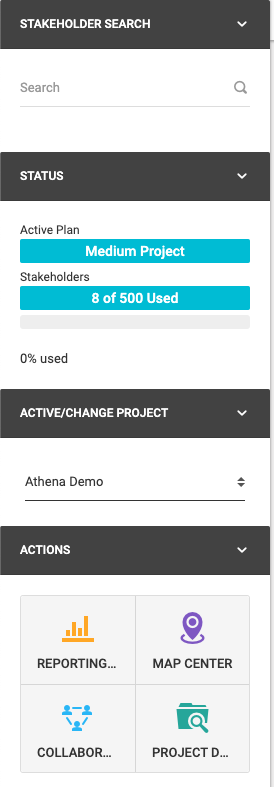
- Stakeholder Search
- Allows you to search for a stakeholder
- Status
- Shows you the plan for the current project and the amount of stakeholders used
- Active/Change Active Project
- The "active" project is shown and you can choose from the list to switch to another project to do work on. You only see the projects you have access to in this list.
- Actions
- There are quick links to access Report Center, Map Center,Collaboration Center and project documents
Breadcrumbs Bar

The breadcrumbs bar shows your location on the site. You can use the links to traverse back to where you came from.